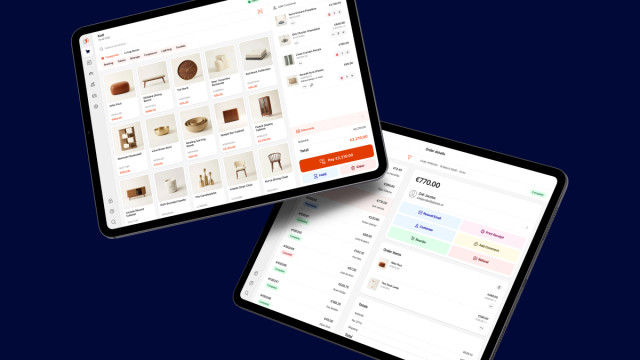
The point of sale built for Magento
A native app for iPhone, iPad and Mac that runs your register directly on Magento. Same catalog, same stock, same customers, same orders as your webshop. No middleware in between, nothing to reconcile at closing time.
Closed pilot in progress. A first group of merchants is running Hyvä POS in their stores now, with the App Store release to follow. Applications for this round are closed — subscribe below and you will be among the first to get access.
Native
Real iOS app for iPhone, iPad and Mac
Direct to Magento
Your store is the backend, no middleware
Unified commerce
One catalog, one customer, one stock figure
Offline mode PRO
Keep selling when the line goes down
Stop running two systems
A customer wants to spend the gift card they bought online. Someone returns a web order at your counter. A shopper reserves online and collects at the desk. With a separate POS, each of those is a workaround, a spreadsheet, or a phone call to the office.
Hyvä POS talks to your Magento over its own API. Not a copy of your catalog, not a nightly export: the same products, prices, stock, customers and orders your webshop already uses. There is no middleware to buy, host and maintain, and no sync job that can quietly fall behind and leave you selling stock you do not have.
- Gift cards and store credit bought online, spent at the register PRO
- Reward points earned in store, spent online PRO
- Buy online and collect in store, with a queue that tells staff what is ready PRO
- Return or exchange a web order at the counter, credit memo and all
- One stock figure: the store and the website sell from the same inventory sources
- Every in-store sale is a normal Magento order, so your reports already include it
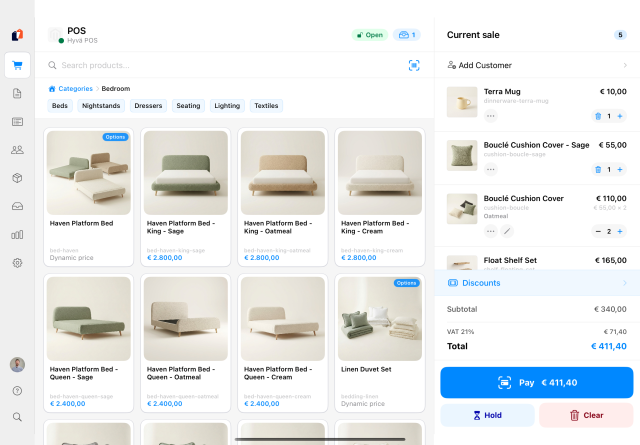
Product catalog
Browse products with category navigation, search and barcode scanning.
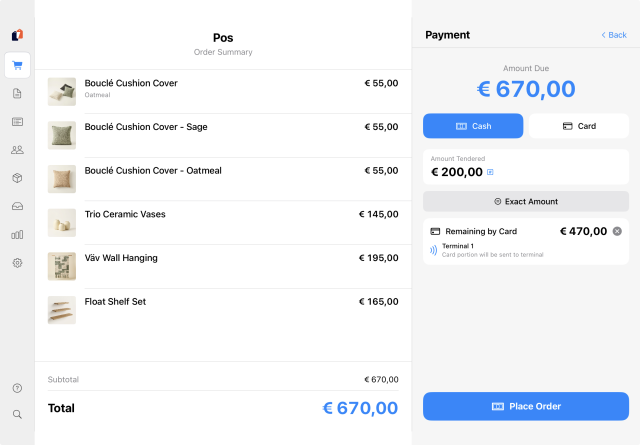
Checkout & payments
Cash, card, Mollie terminal, store credit and split payments.
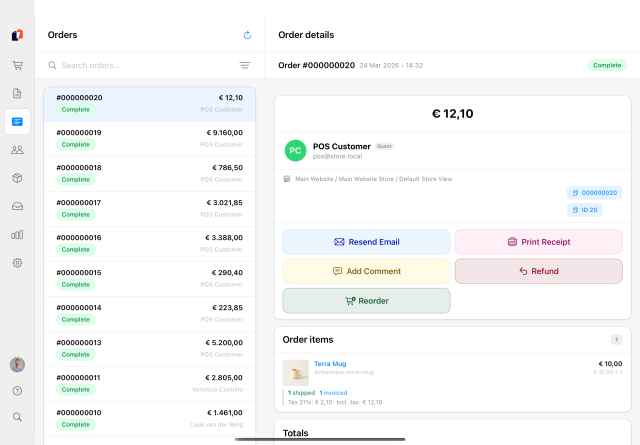
Order management
Full order history with invoices, shipments and credit memos.
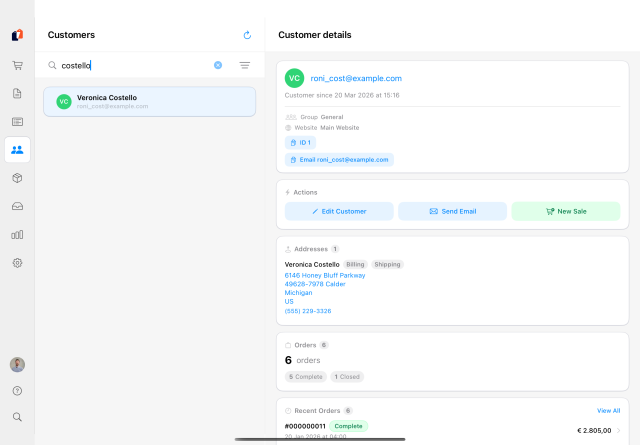
Customer management
Customer lookup, creation and order history.
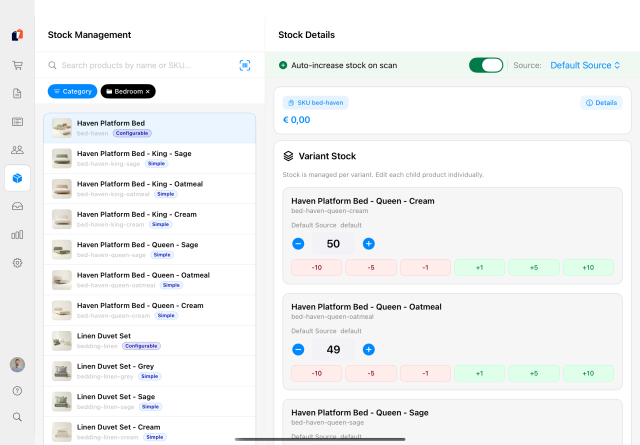
Stock management
View and adjust inventory levels per source.
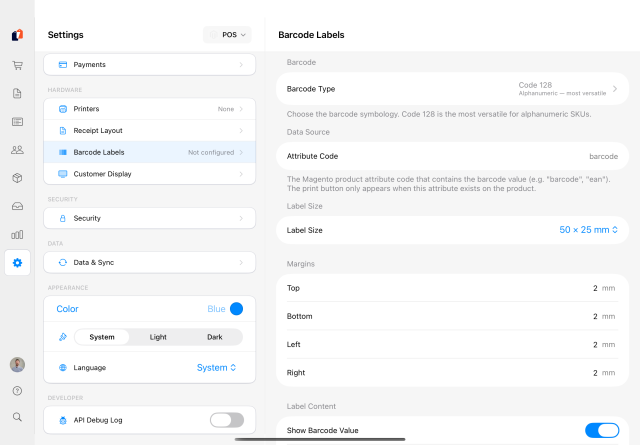
Settings & configuration
Multi-store, printers, receipts and terminal management.
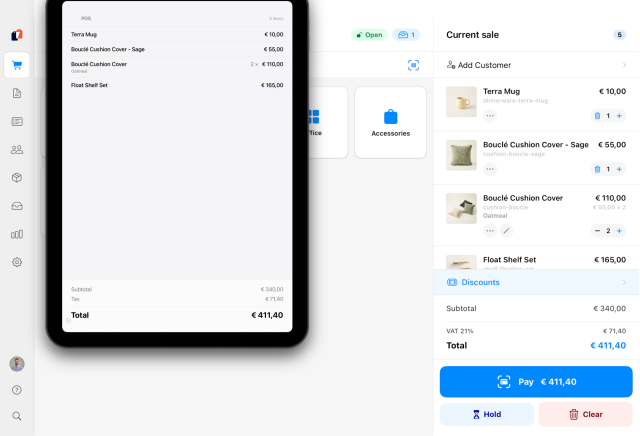
Customer display
Customer-facing screen with the live cart and email capture.
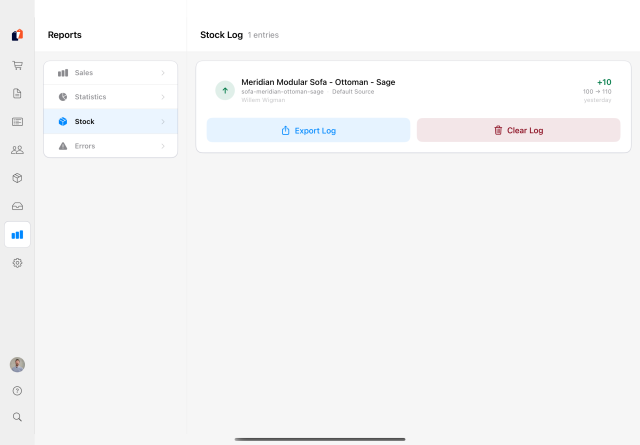
Stock log
Every stock movement the register made, with the reason and who did it.
Watch it work
Three recordings, depending on how much time you have and what you came for: a tour of the app, the case for unified commerce, or the whole thing in detail.
Quick product tour · 21 min
Quick Tour start here
A walk through the screens a cashier uses: the catalog, barcode scanning, held carts, cash and card, and the thinking behind keeping Magento as the source of truth.
Opening keynote · 21 min
Why we built a POS
The Developers Paradise 2026 keynote: what breaks when the store and the webshop keep separate books, why this had to be native rather than a web view, and what unified commerce is worth to a merchant.
Full walkthrough · 56 min
Everything, in detail
The long version, with Willem & Vinai: the register on iPad, iPhone and Mac, free versus PRO, how licensing works, the hardware on the counter, and where gift cards, points and returns fit in.
Everything you need at the counter
The free app is a complete register. PRO adds the Magento module and a per-register licence, which unlock central management, staff, and the cross-channel features below. Anything marked Experimental still needs work before we call it production-ready: it ships switched off, and you turn it on per device under Settings → Advanced.
Full catalog access
Browse your entire Magento catalog with category navigation, search and barcode scanning. Simple, configurable, bundle and grouped products, with customer group, tier and catalog-rule prices applied the way your webshop applies them.
Flexible payments
Cash with denomination counting and change calculation, card through a Mollie terminal, split payments across two tenders, and cash rounding for 5-cent markets. Manual card entry always works, even with no terminal integration.
Receipts that hold up
Print branded receipts on Star, Epson, Brother or any AirPrint printer. Every sale also writes an immutable local receipt with the exact tax the customer paid, which is what your accountant needs and what a reprint months later must still show.
Staff & permissions PRO
Cashier accounts with PIN login managed from Magento, granular role permissions and automatic screen lock. A cashier may not open the register or refund a sale unless you say so, and every consequential action lands in an audit log.
Customer display
A Star SCD222U or Epson DM-D30 two-line display runs on the free tier, driven straight from the receipt printer. Pair a second iPad for a full customer-facing screen with the live cart, totals and the customer typing their own email for a receipt (PRO for the paired iPad).
Register & reports
Open and close with a counted float, cash in and out with a reason, X and Z reports with per-rate VAT and full drawer reconciliation. Sales, register, stock and error reports on the device, exportable to CSV.
Self-checkout PRO Experimental
Turn a spare iPad into a register your customers operate: they scan, pay by card and take a receipt. Anything that needs judgement, discounts, refunds, price overrides, simply does not exist in kiosk mode. Staff hold the exit PIN.
Pickup & special orders PRO
Buy online, collect in store, with a queue that shows staff what is ready and one tap to hand it over. Sell what is not on the shelf too: part now, part later, shipped or collected, all on one order.
Shipping a cart from the counterExperimental
Returns done in one pass PRO
A return in the Magento admin is around 28 steps. At the counter the customer is standing in front of you with the product in hand, so the app collapses it into one flow: check the items, pick the resolution, hand the money back.
Layaway PRO Experimental
Deposit now, pay the balance over the coming weeks, collect when it is settled. Stock stays reserved, every payment goes through the register and prints its own receipt, and the bookkeeping is done properly: invoiced at placement, credit memo if it is cancelled.
Pay by invoice PRO
Business customers who buy on account. The credit limit comes from Magento, the receivable is visible in the admin, and the cashier needs the right permission to extend it. No cash at the counter, no paperwork afterwards.
Cross-channel wallets PRO
Store credit, gift cards and reward points from Adobe Commerce, Amasty, Aheadworks (untested) or Mirasvit (untested). We bridge the modules you already own rather than replacing them, so a balance means the same thing online and at the register.
Know the customer in front of you
A regular walks in. The cashier opens their profile and taps Insights.
Tap Insights on a customer and the register answers what a good salesperson asks, computed live from your Magento order history: what they usually spend, how often they come back, when they were last in, and which items they bought, with the size and colour they chose. Totals are net of refunds, because cashiers say these numbers out loud. PRO
The sheet has an extension layer on the Magento side. Below the built-in figures your developers can add your own cards: loyalty balances, ERP flags, B2B credit terms, anything you can render about a customer. A custom card is one PHP class and one di.xml entry, it inherits the app's design including dark mode, and it ships with a Magento deploy rather than an App Store release. See the Customer Insights documentation.
Built for real-world retail
Items marked PRO need the Magento module and a register licence.
- Cash, card, split payments and manual card entry
- Cash rounding for 5-cent markets
- Coupons, automatic rules, line and cart discounts
- Customer group, tier and catalog-rule prices
- Custom lines for anything not in the catalog
- Hold and recall carts, shared across registers PRO
- Reverse charge for VAT-exempt business sales
- Customer insights at the counter: spend, frequency and recent items PRO
- Register open and close with cash reconciliation
- Cash drawer kick on any RJ11 or RJ12 drawer
- Refunds and exchanges straight from the order
- Receipts mirrored to Magento with a QR page customers can claim PRO
- Staged returns with condition and reason per item PRO
- Audit log of every staff action PRO
- Offline mode: sell with no connection, sync later PRO
- Stock by inventory source, adjusted from the register
- Stock transfers between sources PRO
- Multi-store and multi-currency, priced per store view
- Locations, terminals and settings pushed from Magento PRO
- Barcode scanning by Bluetooth scanner, MFi or camera
- Barcode label printing on Zebra and Brother label printers
- Carrier shipping labels from the register PRO
Hardware you might already own
We include as much support as possible for standard retail kits, without restricting you to a proprietary bundle. That means you can pick from a range of products, and you might already own the right ones in your current setup.
Our favorite: The one-cable counter
A Star mC-Print3 or Epson TM-m30III powers the iPad over USB-C, prints the receipt, kicks the cash drawer and hosts the customer display. One cable to connect, and no network dependency between the iPad and the printer.
- Printers: Star, Epson, Brother (including mobile RJ models), Zebra label printers, or any AirPrint printer
- Scanners: Socket Mobile MFi, Bluetooth keyboard-wedge scanners, or the device camera
- Customer displays: Star SCD222U and Epson DM-D30 two-line displays, or a paired iPad for a full screen (PRO)
- Cash drawers: any kick-driven RJ11 or RJ12 drawer, including the Star mPOP with printer and drawer in one chassis
- Payments: Mollie terminals, including the mobile one for markets and pop-ups. Other PSPs are planned, and you can always work with a stand-alone payment terminal
Fiscal compliance, country by country
Some countries require every register sale to be signed by a certified service, and you cannot legally run a register there without it. Hyvä POS signs through fiskaly, and none of it is production-ready today: the pilot runs in countries where no signing is required. This concerns register receipts, meaning consumer sales at the counter. B2B e-invoicing mandates are a separate matter that lives in your Magento, not in the register.
- Nothing to configure: the Netherlands, the United Kingdom, Ireland, the United States, Switzerland, Estonia, Finland and Luxembourg.
- On the roadmap: Germany, Austria, Italy, Spain, France, Portugal and Sweden, all through fiskaly. France and Portugal also require certification of the register software itself, so they will take time to get through.
- Not supported: Poland, Hungary, Romania, Bulgaria, Greece, Slovakia, Croatia, Slovenia, Lithuania and Latvia require certified register hardware or local approval that we do not hold (yet). Our roadmap for support changes based on demand and effort, so tell us if you need one.
- Belgium and Denmark: free for retail and B2B. Their rules target hospitality, so restaurants, cafés and bars are out of scope.
Where signing applies, the service is a third-party subscription with its own per-register cost on top of your licence, roughly €10 to €15 by our current estimate. The fiscal compliance documentation has the country detail, the regulation names and what gets signed. Fiscal law changes from time to time, so if you are unsure about your country or segment, ask us before you go live.
From Magento to your counter in minutes
No middleware, no third-party database. And you can walk through the whole app in demo mode before you connect anything at all.
Connect your store
Install the free app and paste an integration access token from your Magento admin. The app authenticates against the standard REST API and pulls in your catalog, customers, tax rules and settings. No module required to start selling.
Set up the counter
Connect a receipt printer and scanner, choose payment methods, brand the receipt. On PRO you do this once in Magento instead: locations, terminals, staff and receipt layout are pushed out, so nobody in the store has to configure anything.
Start selling
Scan, discount, take payment, print. Every sale becomes a normal Magento order and an immutable local receipt, and a daily check compares the two so a tax-rule or rounding mismatch surfaces instead of hiding in your books.
Pricing
€50 per register, per month
That is the whole model. Not per user, not per location, not per SKU, and never a percentage of your sales.
Free
A complete register on one device, from the App Store, at no cost. Catalog, checkout, cash and card, receipts, register close, refunds and reports. Demo mode lets you try all of it before connecting a store.
PRO — €50 / register / month
Adds the Magento module and a register licence: central management, staff and roles, offline mode, receipt sync, cross-channel wallets, staged returns, pickup, special orders, layaway, pay by invoice and self-checkout.
Why only registers? Other POS systems charge by location, users, SKUs or revenue. All of that is already yours, on your own Magento instance that you already pay for. Adding products or staff does not cost us anything, so it does not cost you anything either. Your bill stays predictable.
Two registers are included with Hyvä Commerce.
Scale up and back down. Add a register for a busy season and drop it again afterwards. Mid-cycle additions are charged for the remaining days and then align to your billing cycle.
We stay out of your payments. You keep your own contract with your payment provider and pay their fees, not ours. We never sit between you and your money.
Your data stays yours. Orders, receipts and fiscal history live in your Magento, not in our cloud. If you ever leave, there is nothing to migrate out of someone else’s system.
For agencies and integrators
A POS you can actually demo. Your client installs the free app, opens demo mode, connects their store and sees their own catalog on a register within minutes. No sandbox to provision, no sales call in between. When they want PRO it is a licence, not a migration.
You extend it where you already work: on the Magento side. The app itself is not extendable. The bridge to Magento is: store credit, gift cards, reward points, returns, customer pricing, customer validators and the customer-insight cards are open interfaces, so the vendor modules your client already owns get bridged instead of replaced. Bridges ship for Adobe Commerce, Aheadworks, Amasty and Mirasvit.
Technical partners get free developer licences for demos and development.
Coming from Shopify POS or Lightspeed?
There is a good chance you already own the hardware. The standard kit sold for those registers, Star mPOP, TSP100 and TSP143, mC-Print, the Epson TM-m30 series, Socket Mobile scanners and ordinary RJ11 or RJ12 cash drawers, is largely what Hyvä POS supports.
That makes trying a migration close to free: leave the counter as it is, install the free app, connect your store and process a test sale on the hardware you already have. No new equipment, no subscription, and no commitment while you evaluate.
Check your exact models before you rely on them. Printer families ship in many variants and a few of them are locked to one platform or have no iPad connection at all.
Read the documentation
Full documentation for merchants and developers: getting started and connecting your store, every feature explained, hardware guides for printers, scanners and displays, the PRO module and licensing, and a complete API reference with bridge interfaces for building your own integrations.
Be among the first
The closed pilot is starting now with the merchants who already signed up, so applications for this round have closed. Subscribe and we will tell you the moment access opens up: new subscribers go to the front of the queue, ahead of the public App Store release.
No spam. Unsubscribe anytime.
